一、需求
防火墙系统版本升级方式除了通过web界面升级外,还可以通过tftp命令行方式下升级,现在需要通过tftp方式来升级防火墙系统版本。
注意: 升级前,务必做好配置备份,参见 日常维护>>配置备份及恢复。
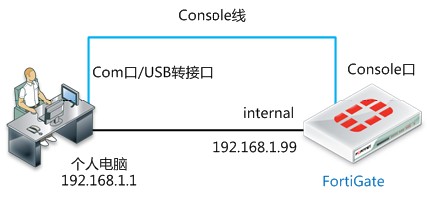
二、拓扑图
三、配置要点
1.准备好工具,连接好console线
2.连接网线,保证通讯正常
3.搭建好tftp服务器
4.开始升级
四、配置步骤
1.准备好工具
准备好console线,网线,升级文件,tftp工具,PC没有com口,需要购买转usb的线缆,并且装好驱动
2.连接网线,保证通讯正常
3.搭建好tftp服务器
4.开始升级
搭建tftp服务器,可下载附件里的cisco tftp服务器
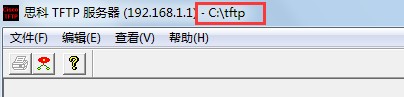
运行cisco tftp软件,将升级固件包放在下图红框中显示的文件夹内(安装程序时会指定文件夹):如下图中的c:\tftp
重新启动设备,按如下步骤升级
1、重启设备"FW81CM3909600364 # execute reboot
2、 重启开始时将出现"Press any key to display configuration menu...",此时按任意键 进入BIOS菜单
Press any key to display configuration menu...
...
[G]: Get firmware image from TFTP server.
[F]: Format boot device.
[B]: Boot with backup firmware and set as default.
[I]: Configuration and information.
[Q]: Quit menu and continue to boot with default firmware.
[H]: Display this list of options.
Enter Selection [G]:
Enter G,F,B,I,Q,or H:
3、选择F,格式化Flash卡
Enter G,F,I,Q,or H: F //选择F,将flash卡格式化,原有配置文件及OS将会被删除掉。可选。
It will erase data in NAND. Continue ? [yes/no]:yes
4、选择G,下载镜像文件
Enter G,F,I,Q,or H: G //选择G,从服务器上下载镜像文件
Please connect TFTP server to Ethernet port 'WAN1'. //将电脑连接至防火墙的WAN1口
Enter TFTP server address [192.168.1.168]: 192.168.1.1 //输入TFTP服务器地址
Enter local address [192.168.1.188]: 192.168.1.99 //为WAN1配置一个临时ip地址
Enter firmware image file name [image.out]: FGT_60C-v5-build0292-FORTINET.out //输入镜像文件的名字
MAC:00:09:0f:d8:a2:c4
Connect to tftp server 192.168.1.1 ...
###########################################
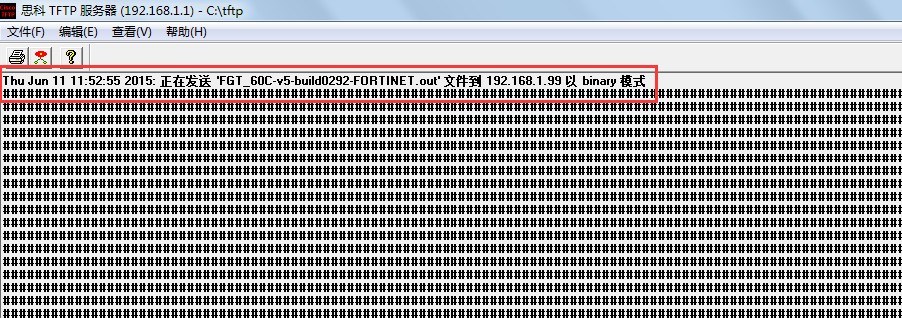
5、 同时tftp服务器也会提示下载成功
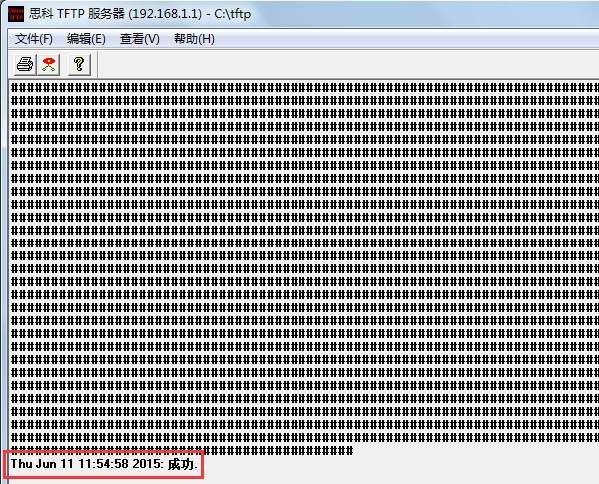
Receiving Image OK.
Save as Default firmware/Backup firmware/Run image without saving:[D/B/R]? D //作为默认的引导文件
Programming the boot device now.
................................................................................................................................................................................................................................................................
Reading boot image 41025536 bytes.
Initializing firewall...
System is starting...
Resizing shared data partition...done
Formatting shared data partition ... done!