FortiGate VM版本FORTIOS V6.2.1
测试拓扑

共享带宽限速:
限制Iperf Clients传输速度(包括上行和下线速度)为:5M
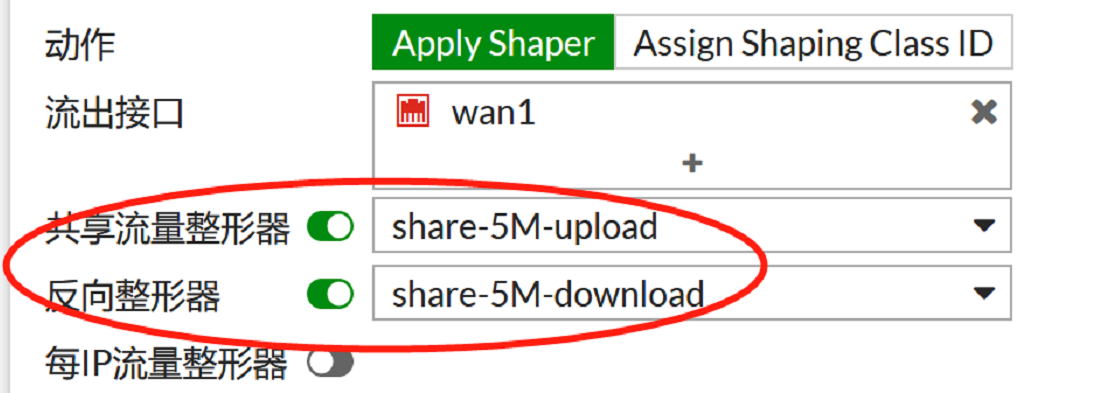
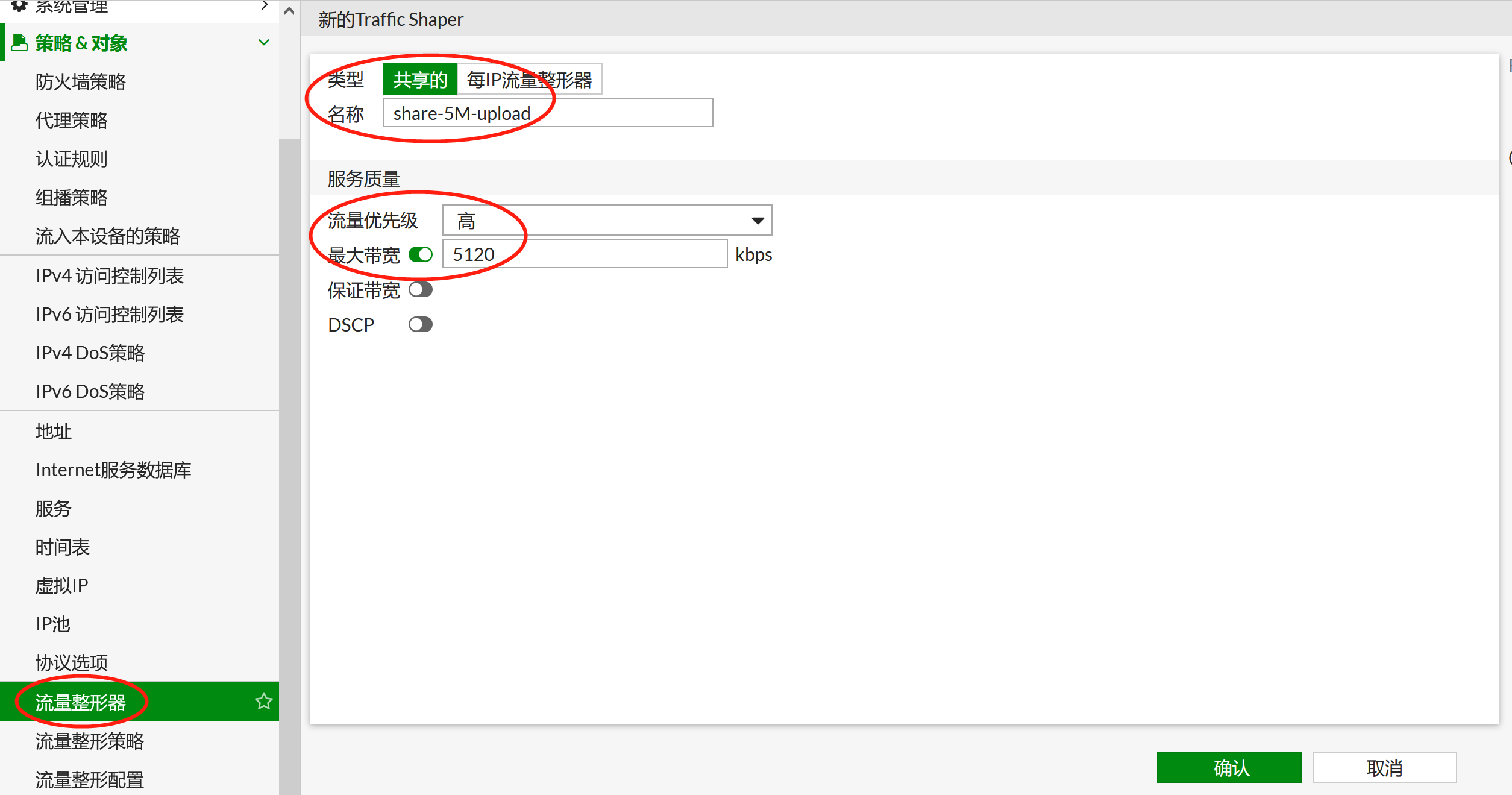
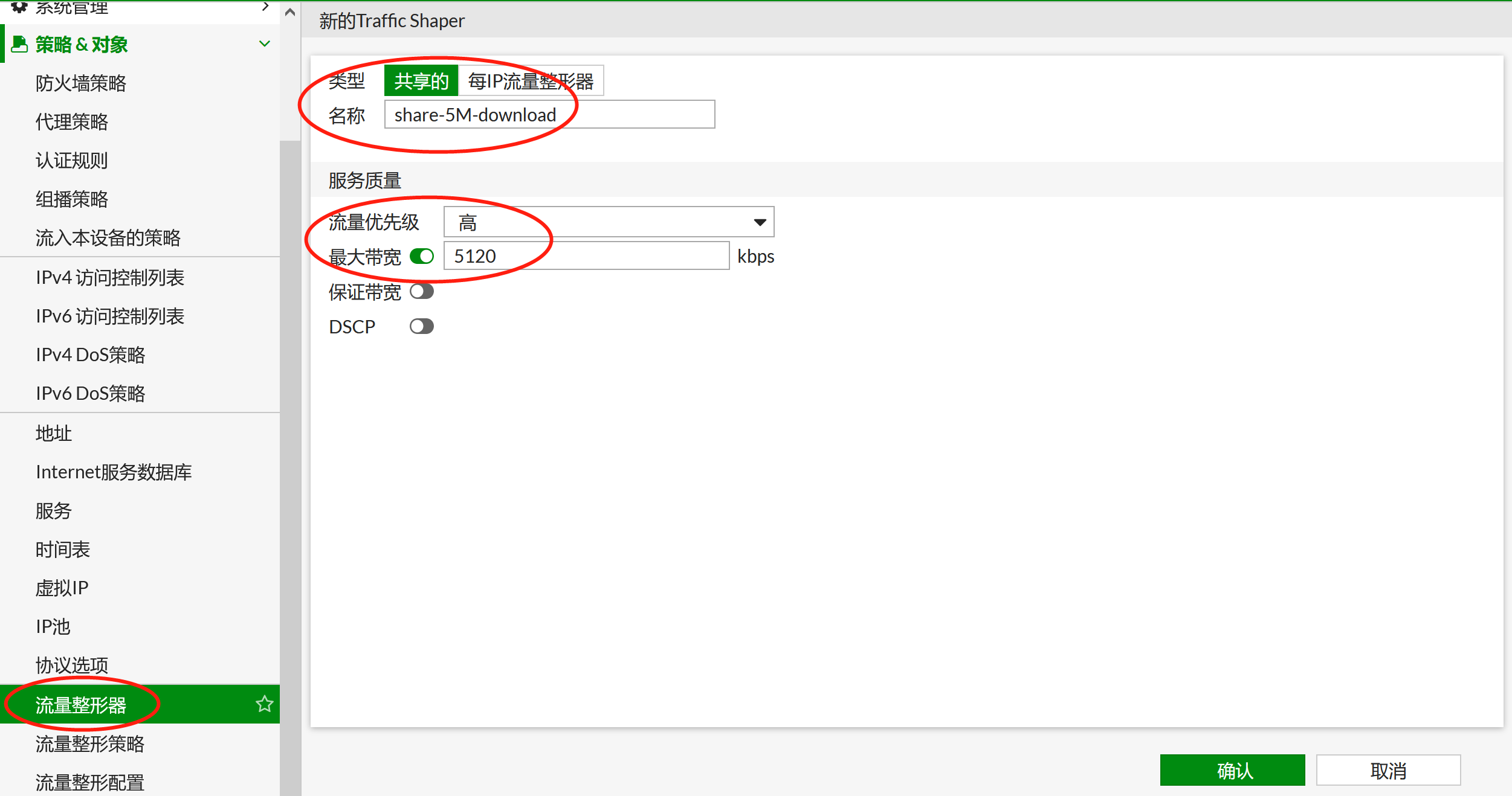
注意:如果需要上传和下载限速分别配置为5M,需要分别配置上传和下载的traffic shaper。如果上传和下载引用了同一个traffic shaper,则上传和下载会共享1个5M。
配置上传共享带宽限速:
配置下载共享带宽限速:
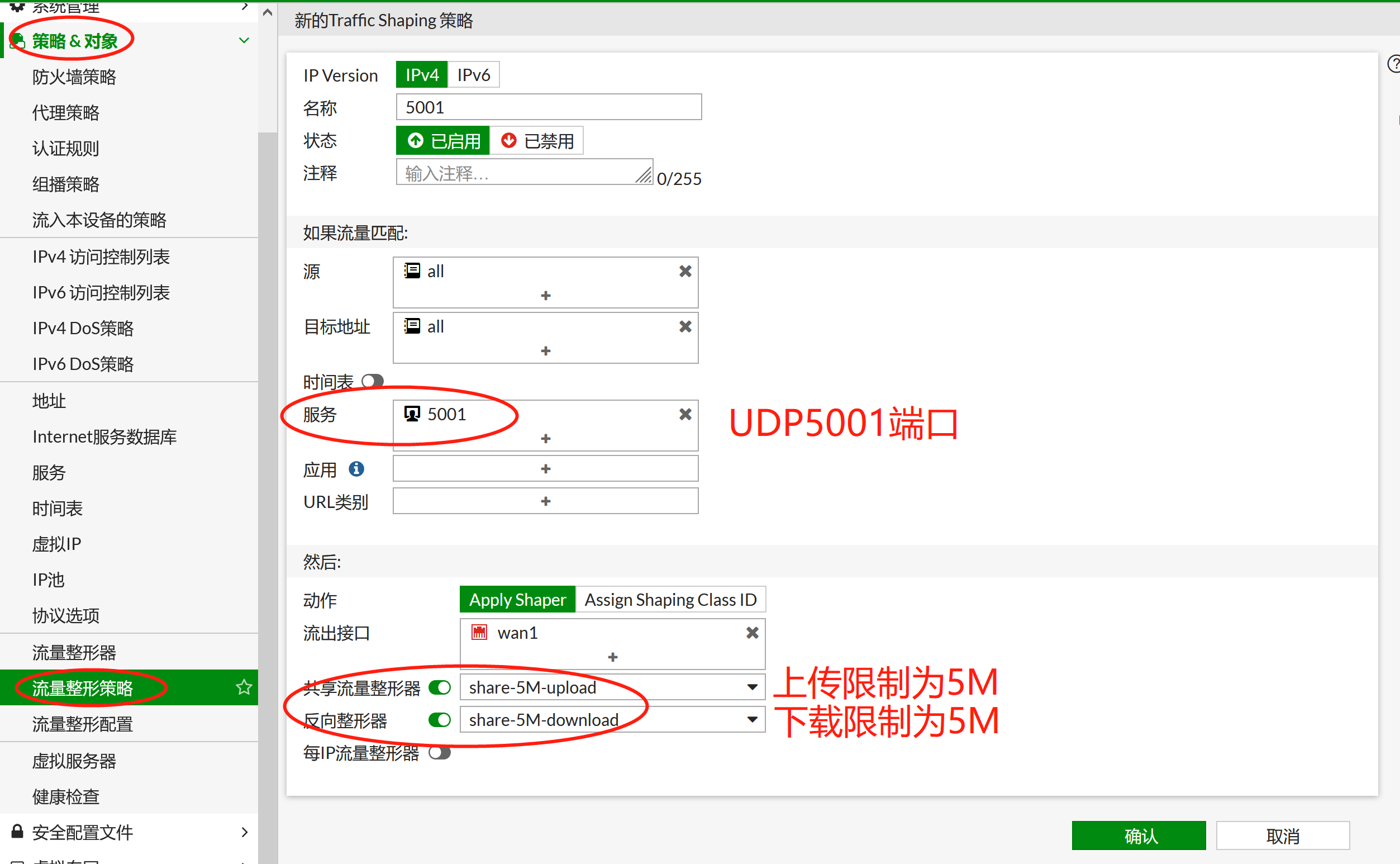
应用到流量整形策略:

IPerf打流测试:
测试打30M流
客户端端观察:
C:\iperf-3.1.3-win64>iperf3.exe -c 2.2.2.2 -p 5001 -u -b 30M -l 1K
Connecting to host 2.2.2.2, port 5001
[ 4]
local 192.168.10.23 port 49590 connected to 2.2.2.2 port 5001
[ ID] Interval Transfer Bandwidth Total Datagrams
[ 4] 0.00-1.00 sec 3.30 MBytes 27.7 Mbits/sec 3380
[ 4] 1.00-2.00 sec 3.61 MBytes 30.2 Mbits/sec 3692
[ 4] 2.00-3.00 sec 3.69 MBytes 30.9 Mbits/sec 3774
[ 4] 3.00-4.00 sec 3.66 MBytes 30.7 Mbits/sec 3748
[ 4] 4.00-5.00 sec 3.46 MBytes 29.0 Mbits/sec 3546
[ 4] 5.00-6.00 sec 3.66 MBytes 30.7 Mbits/sec 3745
[ 4] 6.00-7.00 sec 3.39 MBytes 28.4 Mbits/sec 3468
[ 4] 7.00-8.00 sec 3.53 MBytes 29.6 Mbits/sec 3612
[ 4] 8.00-9.00 sec 3.62 MBytes 30.3 Mbits/sec 3705
[ 4] 9.00-10.00 sec 3.66 MBytes 30.7 Mbits/sec 3743
- - - - - - - - - - - - - - - - - - - - - -
- - -
[ ID] Interval Transfer Bandwidth Jitter Lost/Total Datagrams
[ 4] 0.00-10.00 sec 35.6 MBytes 29.8 Mbits/sec 0.196 ms 29694/36412 (82%)
[ 4] Sent 36412 datagrams
iperf Done.
服务器端观察:
C:\iperf-3.1.3-win64>iperf3.exe -s -p
5001
-----------------------------------------------------------
Server listening on 5001
-----------------------------------------------------------
Accepted connection from 2.2.2.1, port
61655
[ 5]
local 2.2.2.2 port 5001 connected to 2.2.2.1 port 49590
[ ID] Interval Transfer Bandwidth Jitter Lost/Total Datagrams
[ 5] 0.00-1.00 sec 1.08 MBytes 9.05 Mbits/sec 0.205 ms 2219/3325 (67%)
[ 5] 1.00-2.00 sec 628 KBytes 5.14 Mbits/sec 0.155 ms 3072/3700 (83%)
[ 5] 2.00-3.00 sec 641 KBytes 5.25 Mbits/sec 0.154 ms 3118/3759 (83%)
[ 5] 3.00-4.00 sec 627 KBytes 5.13 Mbits/sec 0.175 ms 2952/3579 (82%)
[ 5] 4.00-5.00 sec 610 KBytes 5.00 Mbits/sec 0.132 ms 3093/3703 (84%)
[ 5] 5.00-6.00 sec 635 KBytes 5.20 Mbits/sec 0.199 ms 3044/3679 (83%)
[ 5] 6.00-7.00 sec 591 KBytes 4.84 Mbits/sec 0.192 ms 2924/3515 (83%)
[ 5] 7.00-8.00 sec 616 KBytes 5.04 Mbits/sec 0.190 ms 3060/3676 (83%)
[ 5] 8.00-9.00 sec 628 KBytes 5.15 Mbits/sec 0.202 ms 3041/3669 (83%)
[ 5] 9.00-10.00 sec 635 KBytes 5.20 Mbits/sec 0.172 ms 3077/3712 (83%)
[ 5] 10.00-10.03 sec 1.00 KBytes 286 Kbits/sec 0.196 ms 94/95 (99%)
- - - - - - - - - - - - - - - - - - - - - -
- - -
[ ID] Interval Transfer Bandwidth Jitter Lost/Total Datagrams
[ 5] 0.00-10.03 sec 0.00 Bytes 0.00 bits/sec 0.196 ms 29694/36412 (82%)
-----------------------------------------------------------
会话状态:
session info: proto=17 proto_state=01
duration=11 expire=179 timeout=0 flags=00000000 sockflag=00000000 sockport=0
av_idx=0 use=4
origin-shaper=share-5M-upload prio=2 guarantee 0Bps max 655360Bps traffic 655739Bps drops
36587508B
reply-shaper=
per_ip_shaper=
class_id=0 shaping_policy_id=3 ha_id=0
policy_dir=0 tunnel=/ vlan_cos=0/255
state=may_dirty os route_preserve
statistic(bytes/packets/allow_err):
org=8138304/7737/1 reply=32/1/1 tuples=2
tx speed(Bps/kbps): 694987/5559 rx
speed(Bps/kbps): 2/0
orgin->sink: org pre->post, reply
pre->post dev=3->4/4->3 gwy=0.0.0.0/0.0.0.0
hook=post dir=org act=snat 192.168.10.23:49768->2.2.2.2:5001(2.2.2.1:49768)
hook=pre dir=reply act=dnat
2.2.2.2:5001->2.2.2.1:49768(192.168.10.23:49768)
misc=0 policy_id=1 auth_info=0
chk_client_info=0 vd=0
serial=00001102 tos=ff/ff app_list=0 app=0
url_cat=0
rpdb_link_id = 00000000 ngfwid=n/a
dd_type=0 dd_mode=0

FGT-1 # diagnose firewall shaper traffic-shaper list
name share-5M-upload
maximum-bandwidth 640 KB/sec
guaranteed-bandwidth 0 KB/sec
current-bandwidth 640 KB/sec
priority 2
overhead 0
tos ff
packets dropped 965353
bytes dropped 1015551356
FGT-1 # diagnose netlink interface list port2
if=port2 family=00 type=1 index=4 mtu=1500
link=0 master=0
ref=17 state=off start fw_flags=0 flags=up
broadcast run multicast
Qdisc=pfifo_fast hw_addr=00:0c:29:e1:7d:41
broadcast_addr=ff:ff:ff:ff:ff:ff
stat: rxp=21438 txp=465340 rxb=12605783
txb=478598536 rxe=0 txe=0 rxd=0 txd=0 mc=0 collision=0
re: rxl=0 rxo=0 rxc=0 rxf=0 rxfi=0 rxm=0
te: txa=0 txc=0 txfi=0 txh=0 txw=0
misc rxc=0 txc=0
input_type=0 state=3 arp_entry=0 refcnt=17
FGT-1 # diagnose netlink qlen get port2
TX queue length for interface port2 is 1000
共享带宽限速上行和下行限速需要分别调用,彼此之间独立工作,特别注意别只限制了上传速度,而没有配置下载速度,然后测速的时候发现限速不准确,标准的上行、下行速度限制为下图所示: